The operator dashboard.
The Atlas story shows what one owner built on a finished foundation: a command center for a 27-unit shopping center. This page is the same idea for everyone else. When your vault is real and your rules are written, a morning screen over your business is a cheap thing to build and an honest thing to trust. Here is the pattern.
A view, never the record
The first rule of any operator dashboard comes straight from the doctrine: your business lives in the vault, in plain files you own, and the dashboard only reads them. It is a view: disposable, regenerable, replaceable on a whim. If the screen died tonight, the business would not notice, because nothing lives there. The moment a dashboard starts holding facts the files do not, it has stopped being a dashboard and started being a second, ungoverned system of record. That is the failure to refuse.
Held to that rule, a dashboard earns its keep every morning. One screen answers the owner's four standing questions: what do the numbers say, what is waiting on me, what did the Operator do while I slept, and what is it reading. Each of those maps to a layer you have already built.
About the picture: the exhibit below is a drawing, not a screenshot of a product. It shows the pattern for Prairie Lawn & Grounds, the same clearly-fictional two-man lawn company from Day One's worked example, with fictional numbers throughout. For a real, running version of this idea, photographed from its own manual, read the Atlas story; for the owner's own console, photographed, see the exhibits at the end of this page.
The four panels, and what each one stands on
The signals Order 6 · Measurement
Four numbers the owner actually steers by, computed from the files, not typed into a widget. If a number on the screen cannot be traced to a file in the vault, it does not belong on the screen.
Stands on: the signals you chose in Order 6, living in structured records a machine can count.
The signature queue Order 3 · Governance
Everything the Operator drafted and parked, waiting for a human. This panel is your Automation Decision Framework made visible: Zone 2 work arrives here as drafts, and nothing on the screen sends itself. The queue is where the owner's judgment gets spent, on purpose, first thing in the morning.
Stands on: written zones, so the machine knows what to draft and what to leave alone.
The trace Order 6 · The correction loop
What the Operator did while you slept, one line per action, each traceable to the file it touched. When something looks wrong, you do not argue with the dashboard: you trace the miss, edit the file that caused it, and retest. The trace is what makes the correction loop possible.
Stands on: an Operator that logs its work, and the miss, trace, edit, retest habit from the Operator page.
The vault panel Order 2 · Knowledge
The files the whole screen is drawn from, named and graded. This panel exists as a reminder more than a control: the dashboard is downstream of the vault, always. Rebuild the dashboard any weekend; the vault is the thing you protect.
Stands on: the Context Vault and Authority Classification, the same two documents everything else in this system stands on.
The real one: the owner's console
The pattern above is the starter version. Here is where it goes at full scale: Adam's own working console, the screen this whole system reports to. Its masthead states the job in six words: see the truth, control the handoff. Everything on it is the doctrine, running: a review queue that turns the gray mass of unclassified files into governed knowledge, which is Authority Classification working as a daily habit rather than a one-time filing. An ask-the-vault panel where every answer shows the path and the authority it stands on. A ledger that keeps one current answer per unit while superseded papers stay kept, marked, and never confused for current. A wiring board that makes Order 3's allowed-tools list visible: every account the business runs on, on one screen, assigned and bounded. And an action gate at the door: Zone 1 runs, Zone 2 waits for a signature, Zone 3 has no button at all.
About this picture: also a drawing, made from the real console's screen before its restyle, with every number, name, and unit replaced by generic stand-ins, because the live console shows real records. It stays here as the design-intent schematic. The photographed panels below show the same console implemented, running a demonstration vault.
The real one, photographed
The console has since been restyled into this design language, so here it is photographed, panel by panel. It is running its demonstration vault: Harbor Point Operations, a synthetic property with synthetic documents, and every screen carries the stamp Demonstration Dataset, Not Live. The pattern in OD-1 and the schematic in OD-2 stand unchanged; these captures show what they look like built. Each one sits beside the standing order it runs.
About these pictures: real software, synthetic data. The Harbor Point vault holds no live records, no connected accounts, and no approved outside actions. The tenant names, unit numbers, dates, and counts are exhibit data, kept separate from the live console on purpose.
The morning screen Order 2 · Knowledge
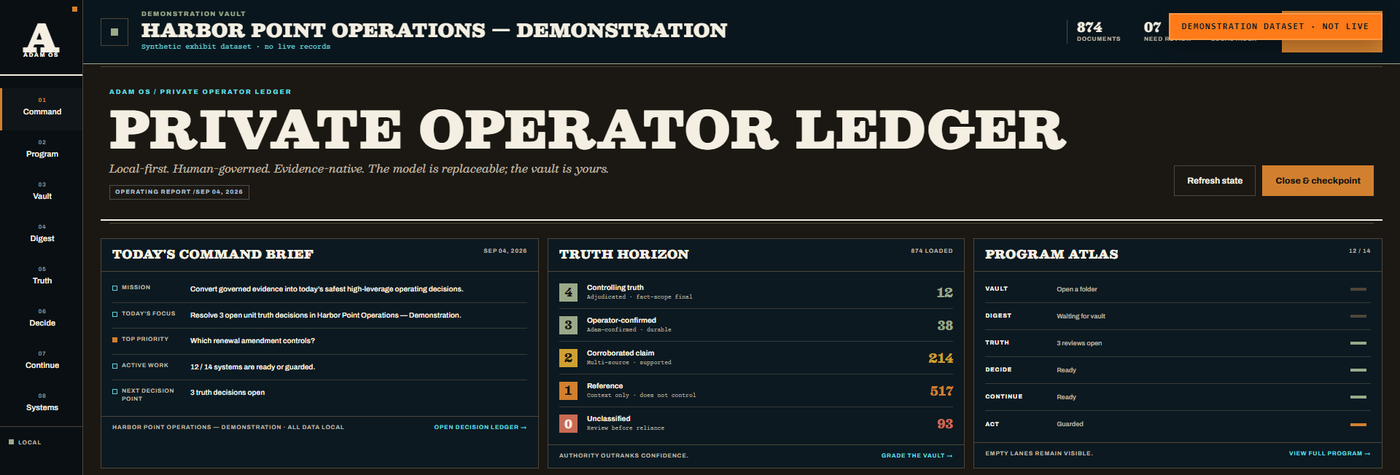
The command brief turns the governed vault into today's decisions: a mission, one focus, one top priority, the next decision point. Beside it the truth horizon counts every document in the vault by its authority level, 4 down to 0: controlling truth, operator-confirmed, corroborated claim, reference, unclassified. The number the owner reads first is the last row. Ninety-three unclassified files are the gray mass, and grading them down is the daily habit Order 2 asks for. The panel's own footer states the rule: authority outranks confidence.
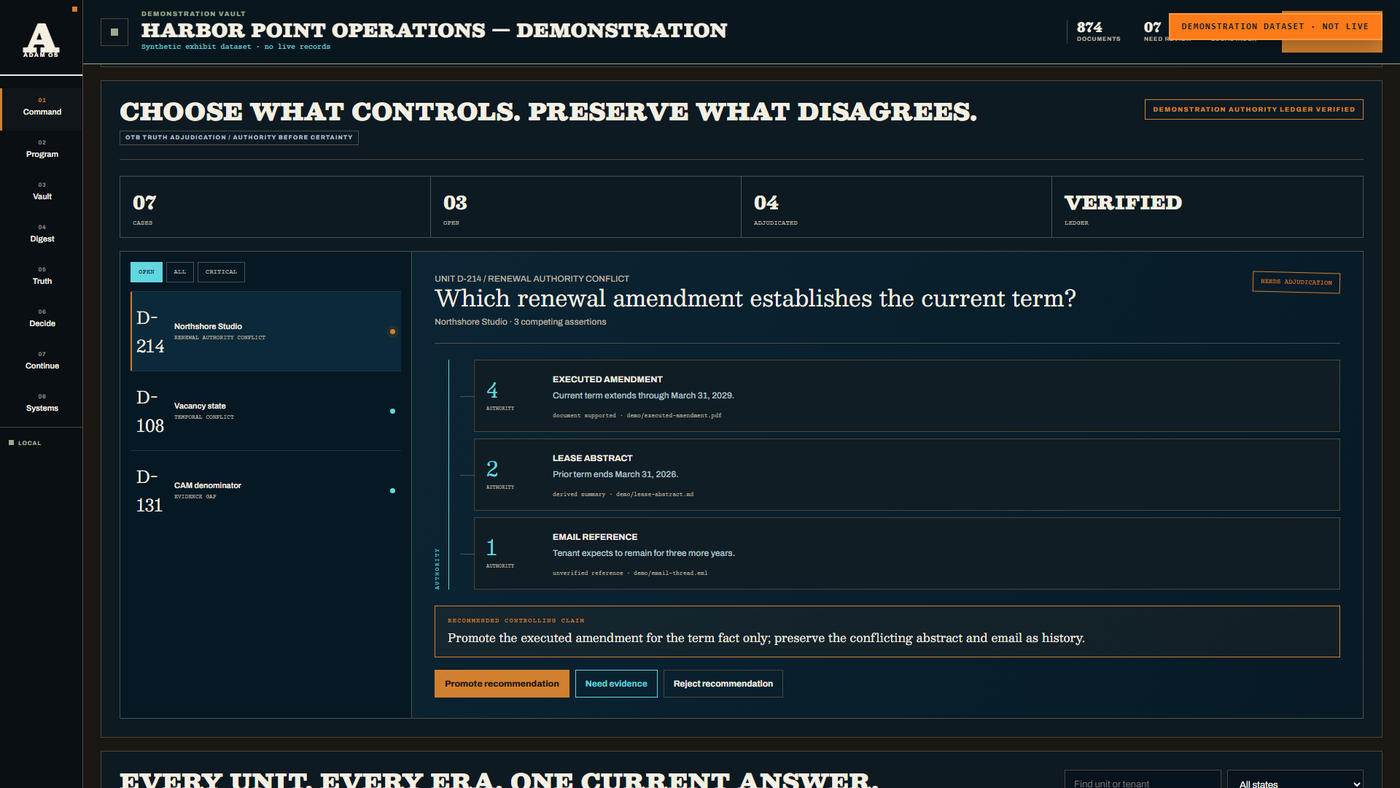
Choose what controls, keep what disagrees Order 2 · Authority
The adjudication bench. Unit D-214 has three papers that disagree about the current lease term: an executed amendment at Level 4, a lease abstract at Level 2, and an email at Level 1. The console lines them up by authority, not by how confident any of them sounds, and recommends promoting the amendment for the term fact only. The abstract and the email stay kept as history, marked as superseded, never deleted. Nothing becomes controlling truth without a person pressing the button, and the button says so.
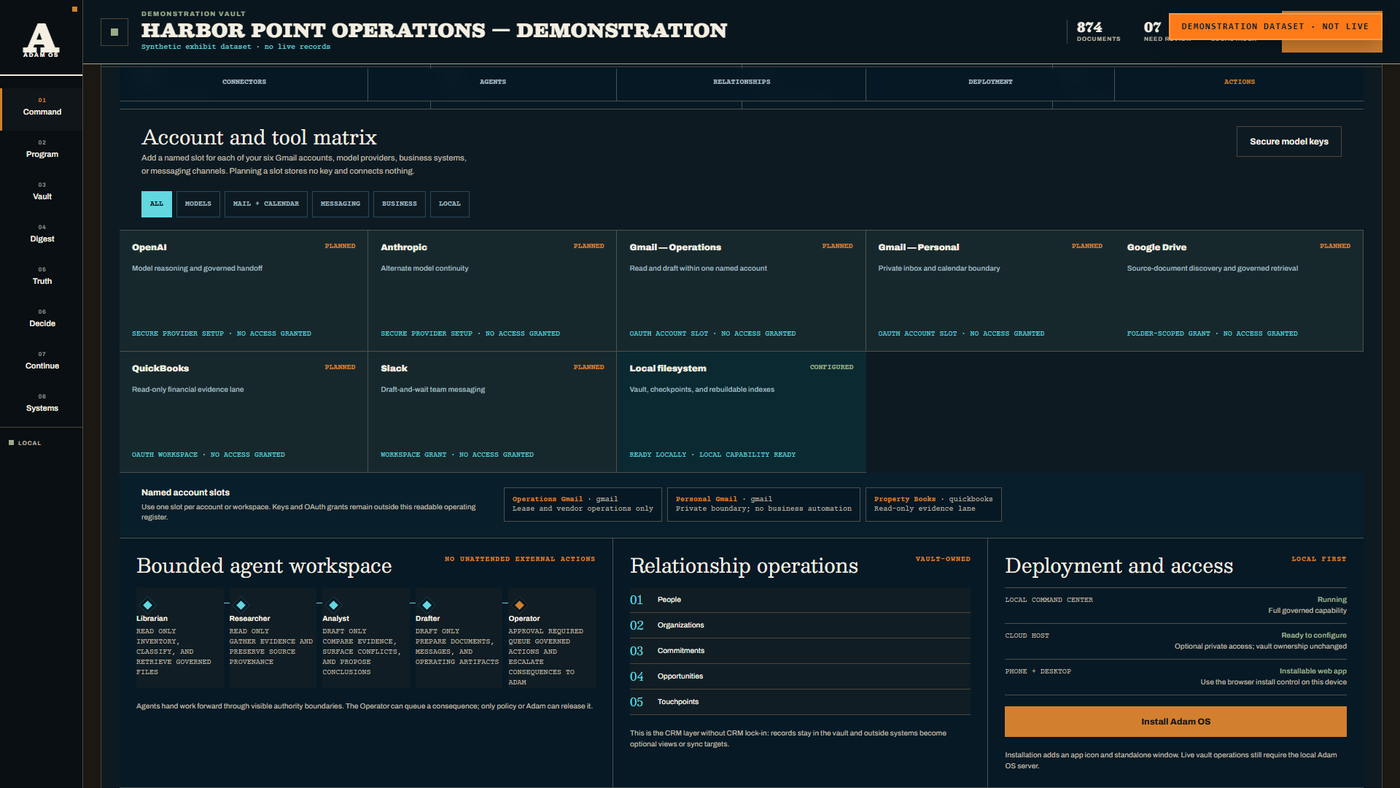
The wiring board Order 3 · Governance
Order 3's allowed-tools list, as a screen. Every account the business could run on has a named slot: two model providers, two mail accounts, the drive, the books, the team channel, the local filesystem. Planned and configured are visibly different states, and a planned slot stores no key and connects nothing. Below it the agent bench draws the trust ladder from the operator page: Librarian and Researcher read only, Analyst and Drafter draft only, and the Operator, the only one that can queue a consequence, cannot release one.
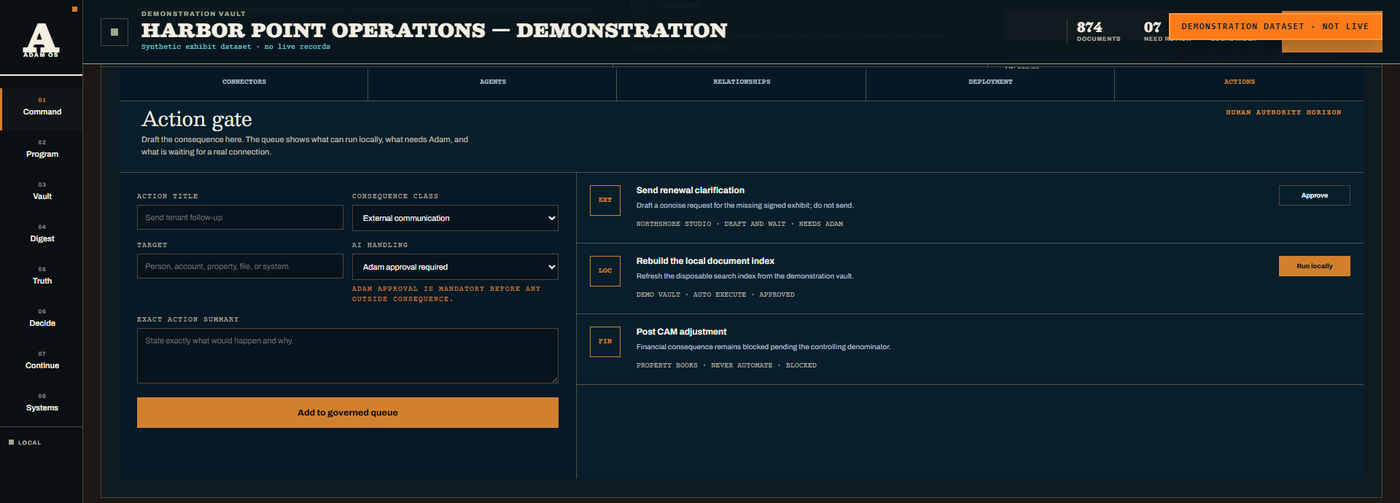
The door Order 3 · The zones
Every proposed consequence names its title, target, class, and handling before it enters the queue, and the queue shows all three zones at once: a local index rebuild that runs itself (Zone 1), a tenant email drafted and waiting for a signature (Zone 2), and a financial posting that is blocked outright (Zone 3, where the label reads never automate and there is no button). Reversible local work can run. Anything that leaves the building waits for the owner.
The closing line Order 5 · Continuity
The console ends where Order 5 does. The checkpoint sits between two model providers, and either can be swapped in: the work, the decisions, the evidence references, the open questions, and the next actions all travel in the vault's own files, not in any model's memory. Continuity & Succession, as a button.

How you get one
Not by buying one. A dashboard like this is downstream of the documents, which means it is nearly free once the foundation exists, and nearly impossible before. Any competent AI builder, including the one in your pocket, can generate a working screen over your vault precisely because the vault is plain files with written rules: the hard part was never the dashboard. Building one yourself is squarely a Level 2 skill in the Curriculum: an agent that reads your files, a screen that shows them, evals that keep it honest.
Hold every version, bought or built, to the same three rules: it reads the vault and never replaces it. Zone 3 never gets a button. And if it died tonight, the business would not notice by morning.
The proof this is not theory: Atlas is this exact pattern, grown to fourteen sheets for a real shopping center, running today on the documents this guide teaches. The dashboard scales with the business. The rules do not change.